
CC Switch
Product status: Status not recorded
No lifecycle review is recorded for this listing. Its inclusion in the directory does not confirm current availability; check the vendor before relying on it.
No status check date recorded
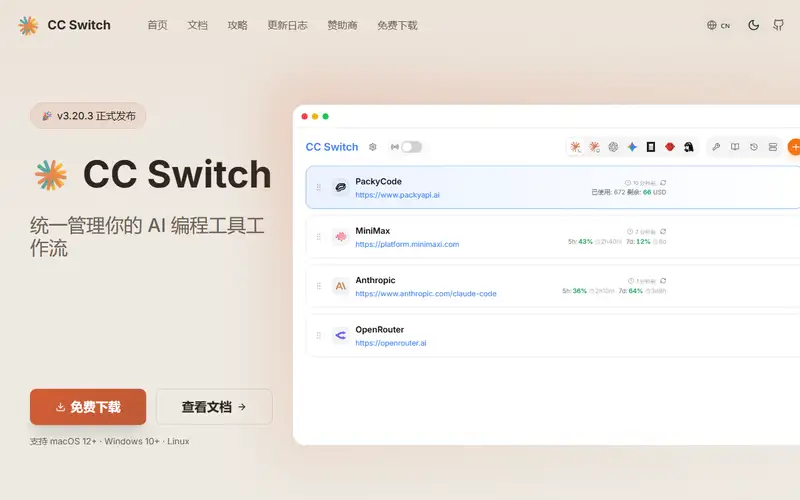
Manages provider configuration, routing, MCP servers, skills, sessions and usage across several AI coding CLIs. No lifecycle review is recorded for this listing. Its inclusion in the directory does not confirm current availability; check the vendor before relying on it.
Product preview
Overview
CC Switch manages the settings that accumulate around AI coding CLIs: which provider each one talks to, how requests are routed, which MCP servers and skills are enabled, and what the sessions cost. It covers Claude Code, Codex, Gemini CLI and others from one desktop application.
This is housekeeping software, and the fact that it exists is the interesting part. A developer now runs several coding CLIs, each with its own configuration format, its own notion of a provider, and its own place to keep credentials, and the result is that routine facts — which key is in use, where the requests are actually going, what this month cost — become hard to answer. Tools like this are a tax on an ecosystem that never agreed on a standard, and their value lasts exactly as long as that fragmentation does. The honest caution with any tool that centralises credentials for several providers in one place is that it is now a single point of compromise: that concentration is the convenience and the risk at the same time.
Sources
The factual claims in this review were read from the pages below. Each date is when an editor last opened the source, not when the product changed.
- Vendor site Checked 2026-09-19
- Vendor documentation Checked 2026-09-19
Pros / Cons
Pros
- Answers questions that fragmentation makes hard: which key, which route, what cost
- Covers several coding CLIs from one place
- Open source, so the credential handling can be inspected
Cons
- Centralising credentials for several providers creates a single point of compromise
- Its usefulness depends on an ecosystem that has not standardised, and ends when it does
- Was not installed or run here, so nothing about its own behaviour was observed
Who it's for
Managing provider keys across several coding CLIs
Seeing where requests actually go
Tracking usage and cost per tool
Sharing one MCP and skill setup across agents
Bottom line
Housekeeping for a fragmented tool landscape — genuinely useful, and a credential concentration that should be a deliberate decision.
Key Features
Tags
Frequently asked questions
Is CC Switch currently available?
No lifecycle review is recorded for this listing. Its inclusion in the directory does not confirm current availability; check the vendor before relying on it.
What is CC Switch?
CC Switch is a Agents & Developer Tooling tool developed by CC Switch. Manages provider configuration, routing, MCP servers, skills, sessions and usage across several AI coding CLIs.
Is CC Switch free?
Yes — CC Switch is free to use.
Is CC Switch open source?
Yes — CC Switch is open source. The source code is publicly available at https://github.com/farion1231/cc-switch.
What are the best alternatives to CC Switch?
Notable Agents & Developer Tooling alternatives include Firecrawl, Browser Use, Daytona. Browse all 33 tools in our Agents & Developer Tooling category for a full overview.
Was this listing useful?
Basic Info
- Pricing
- Free
- Editorial score
- ★ 4 / 5 How we score
- Platforms
- DesktopCLI
- Last verified
- Not recorded