
Cold Turkey
Cold Turkey
★ #21 in ProductivityProduct status: Status not recorded
No lifecycle review is recorded for this listing. Its inclusion in the directory does not confirm current availability; check the vendor before relying on it.
No status check date recorded
A Windows/macOS website and application blocker with schedules, locks and configurable breaks; it does not offer user-facing AI. No lifecycle review is recorded for this listing. Its inclusion in the directory does not confirm current availability; check the vendor before relying on it.
Product preview
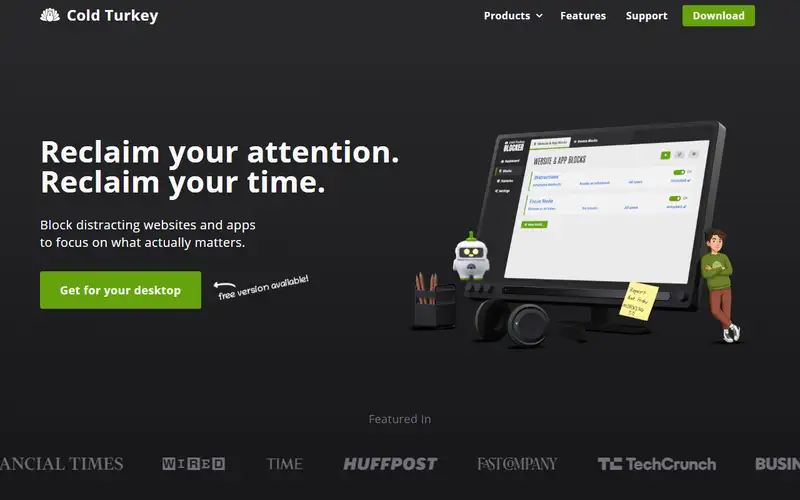
Decision notes
Official-document research
Based on the cited documentation. We did not use the product, purchase a plan, or run quality, speed or reliability tests in this review.
Consider it for
- Individuals controlling distractions on their own PCs
Choose another approach if
- Phone-wide blocking
- An AI coach or an off-the-shelf company licence
Pricing and conditions
Current terms unconfirmed
Free covers website/timed blocks and statistics; Pro adds apps, schedules, locks and breaks. Pro is a one-time personal purchase for the computers you use, with updates during the product's commercial lifespan, a 7-day trial and an initial-purchase 30-day refund policy. No amount rendered. Currency/region vary; terms generally include applicable taxes unless stated otherwise. Organizational pricing and the installation EULA remain unconfirmed.
Pricing source read:
Pricing or terms sourceCode, model and service licensing
The software is proprietary despite included open-source components. Terms restrict the standard licence to personal use; commercial, nonprofit, government and educational organizations need a separate agreement. Licences last for the product's commercial lifespan and cannot be shared or resold. The vendor says block settings/history stay local and are not collected, but email, purchase/licence use and security logs are processed. Its no-third-party-model-training statement is not zero collection.
Basis and limits of the recorded score
The existing 4.6 is retained. Its original scoring worksheet is unavailable; this documentation review supplies no hands-on, accuracy, speed or outcome score.
Overview
Cold Turkey Blocker applies website lists, URL patterns and, in Pro, application blocks and schedules on Windows/macOS. Lock settings can prevent changing a block or removing its extension while active; break and allowance rules provide alternatives to continuous blocking. This is a conventional productivity tool: its AI policy says no local or third-party models are used during software or website operation.
It fits personal desktop distraction control when you are willing to configure restrictions carefully. Review emergency access and required permissions before locking anything. No bypass-resistance or productivity outcome was tested.
Sources
The factual claims in this review were read from the pages below. Each date is when an editor last opened the source, not when the product changed.
- Vendor documentation Checked 2026-10-15
- Vendor pricing page Checked 2026-10-15
- Vendor documentation Checked 2026-10-15
- Vendor documentation Checked 2026-10-15
- Vendor documentation Checked 2026-10-15
Pros / Cons
Pros
- Multiple lock and break settings
- Local block statistics with export
Cons
- No mobile or Linux support documented
- Organizational use needs a separate agreement
Who it's for
Personal desktop focus sessions
Recurring website blocks
Time allowances for distracting apps
Bottom line
A non-AI desktop blocker for personal use; check lock settings and the actual licence price.
Key Features
Tags
Frequently asked questions
Is Cold Turkey currently available?
No lifecycle review is recorded for this listing. Its inclusion in the directory does not confirm current availability; check the vendor before relying on it.
What is Cold Turkey?
Cold Turkey is a Productivity tool developed by Cold Turkey. A Windows/macOS website and application blocker with schedules, locks and configurable breaks; it does not offer user-facing AI.
What costs and terms should I check for Cold Turkey?
Free covers website/timed blocks and statistics; Pro adds apps, schedules, locks and breaks. Pro is a one-time personal purchase for the computers you use, with updates during the product's commercial lifespan, a 7-day trial and an initial-purchase 30-day refund policy. No amount rendered. Currency/region vary; terms generally include applicable taxes unless stated otherwise. Organizational pricing and the installation EULA remain unconfirmed.
Is Cold Turkey open source?
The software is proprietary despite included open-source components. Terms restrict the standard licence to personal use; commercial, nonprofit, government and educational organizations need a separate agreement. Licences last for the product's commercial lifespan and cannot be shared or resold. The vendor says block settings/history stay local and are not collected, but email, purchase/licence use and security logs are processed. Its no-third-party-model-training statement is not zero collection.
What are the best alternatives to Cold Turkey?
Notable Productivity alternatives include Notion AI, Grammarly, Canva AI. Browse all 159 tools in our Productivity category for a full overview.
Was this listing useful?
Basic Info
- Pricing
- Freemium
Free covers website/timed blocks and statistics; Pro adds apps, schedules, locks and breaks. Pro is a one-time personal purchase for the computers you use, with updates during the product's commercial lifespan, a 7-day trial and an initial-purchase 30-day refund policy. No amount rendered. Currency/region vary; terms generally include applicable taxes unless stated otherwise. Organizational pricing and the installation EULA remain unconfirmed.
- Editorial score
- ★ 4.6 / 5 How we score
- Platforms
- WindowsmacOS
- Last verified
- Not recorded