
ComfyUI
Product status: Status not recorded
No lifecycle review is recorded for this listing. Its inclusion in the directory does not confirm current availability; check the vendor before relying on it.
No status check date recorded
Node-based media workflows with JSON graph exchange and custom extensions; local open-source software, paid cloud execution and external model calls have separate requirements and costs. No lifecycle review is recorded for this listing. Its inclusion in the directory does not confirm current availability; check the vendor before relying on it.
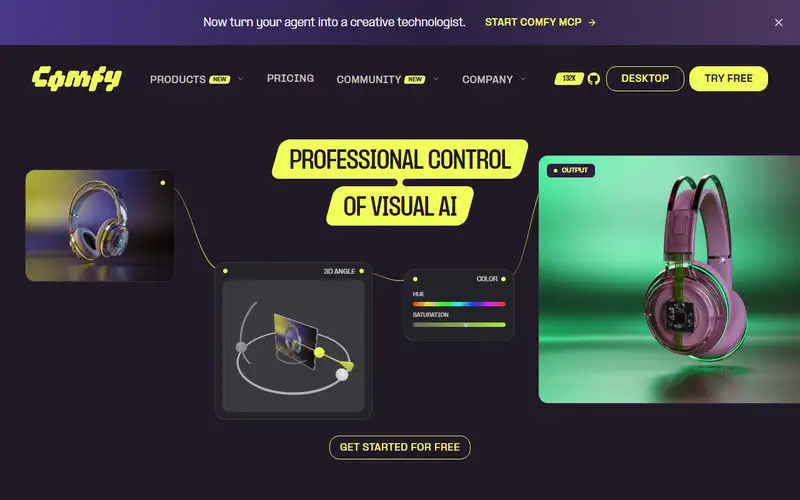
Product preview
Decision notes
Official-document research
Based on the cited documentation. We did not use the product, purchase a plan, or run quality, speed or reliability tests in this review.
Consider it for
- Teams able to manage models, dependencies and workflow versions
- Creators needing a graph they can inspect and modify
Choose another approach if
- A guaranteed zero-cost or maintenance-free hosted service
- Assuming shared JSON includes every model, node or commercial permission
Pricing and conditions
Documented terms
Local ComfyUI/Desktop software is free to use, but hardware, storage, maintenance and model permissions are separate. Cloud plans use credits for GPU runtime and Partner Nodes; annual and monthly allowances differ. BYOK calls can be billed by the provider. Cloud subscription amounts, settlement currency, taxes and region-specific terms were not confirmed here.
Pricing source read:
Pricing or terms sourceCode, model and service licensing
The linked ComfyUI code is published under GPL-3.0. That software license does not establish the rights to each checkpoint, custom node, hosted service or generated output; check the corresponding provider's terms separately.
Basis and limits of the recorded score
The existing 4.7 editorial score is retained; its original scoring evidence is not recorded. This documentation update did not benchmark quality, speed, compatibility or total cost and did not re-score the product.
Overview
ComfyUI builds media-generation workflows as connected nodes. The official repository documents model loaders, conditioning, sampling, editing and upscaling, with JSON workflow saving/loading and custom-node extensions. These are workflow capabilities to evaluate, not evidence that every model is supported or every output is reproducible.
Choose the local application when you can maintain the required models, node versions, dependencies and hardware. A shared graph describes the workflow; another user still needs compatible components and resources. Review a node's behavior before adding it, and check whether the chosen workflow calls external services. Local installation alone does not establish an offline or confidential pipeline.
Comfy Cloud and paid Partner Nodes are separate cost paths. The published GPL-3.0 code license does not grant a blanket license for every model, extension or output. This directory has not installed ComfyUI, run a graph, measured GPU use or compared output quality.
Sources
The factual claims in this review were read from the pages below. Each date is when an editor last opened the source, not when the product changed.
- Vendor documentation Checked 2026-10-15
- Vendor documentation Checked 2026-10-15
- Vendor pricing page Checked 2026-10-15
Pros / Cons
Pros
- Node-based composition and JSON workflow exchange
- Local code available under GPL-3.0
- Custom nodes and optional hosted/API workflows
Cons
- Models, node versions and hardware require management
- Graph sharing alone does not ensure repeatable output
- Model rights, cloud credits and external calls need separate checks
Who it's for
Designing a versioned image or video workflow
Sharing a graph together with documented dependencies
Evaluating local versus hosted execution costs
Bottom line
Consider it when you need editable node workflows and can maintain their components. Confirm model permissions and local, cloud and external-call costs before production.
Key Features
Tags
Compare ComfyUI with alternatives
Frequently asked questions
Is ComfyUI currently available?
No lifecycle review is recorded for this listing. Its inclusion in the directory does not confirm current availability; check the vendor before relying on it.
What is ComfyUI?
ComfyUI is a Image Generation tool developed by Comfy Org. Node-based media workflows with JSON graph exchange and custom extensions; local open-source software, paid cloud execution and external model calls have separate requirements and costs.
What costs and terms should I check for ComfyUI?
Local ComfyUI/Desktop software is free to use, but hardware, storage, maintenance and model permissions are separate. Cloud plans use credits for GPU runtime and Partner Nodes; annual and monthly allowances differ. BYOK calls can be billed by the provider. Cloud subscription amounts, settlement currency, taxes and region-specific terms were not confirmed here.
Is ComfyUI open source?
The linked ComfyUI code is published under GPL-3.0. That software license does not establish the rights to each checkpoint, custom node, hosted service or generated output; check the corresponding provider's terms separately.
What are the best alternatives to ComfyUI?
Notable Image Generation alternatives include Midjourney, Stable Diffusion, Leonardo AI. Browse all 57 tools in our Image Generation category for a full overview.
Was this listing useful?
Basic Info
- Pricing
- Freemium
Local ComfyUI/Desktop software is free to use, but hardware, storage, maintenance and model permissions are separate. Cloud plans use credits for GPU runtime and Partner Nodes; annual and monthly allowances differ. BYOK calls can be billed by the provider. Cloud subscription amounts, settlement currency, taxes and region-specific terms were not confirmed here.
- Editorial score
- ★ 4.7 / 5 How we score
- Platforms
- WindowsmacOSLinuxSelf-hostedCloudAPI
- Last verified
- Not recorded