Filmora
Wondershare
★ #14 in Video GenerationProduct status: Status not recorded
No lifecycle review is recorded for this listing. Its inclusion in the directory does not confirm current availability; check the vendor before relying on it.
No status check date recorded
A desktop video editor for arranging media, effects and captions, with separately metered AI features and asset licensing conditions. No lifecycle review is recorded for this listing. Its inclusion in the directory does not confirm current availability; check the vendor before relying on it.
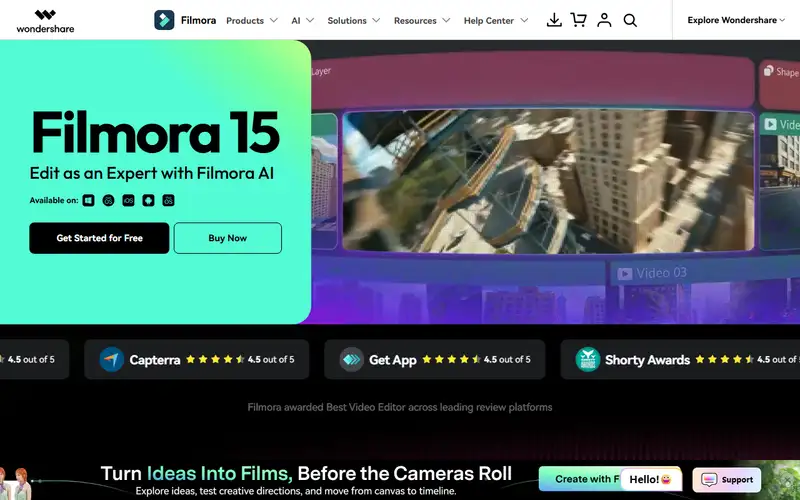
Product preview
Decision notes
Official-document research
Based on the cited documentation. We did not use the product, purchase a plan, or run quality, speed or reliability tests in this review.
Consider it for
- Creators reviewing footage and generated edits
- Teams able to track asset permissions
Choose another approach if
- Assuming one purchase includes all future versions and unlimited AI
- Unreviewed commercial use of every included music track
Pricing and conditions
Documented terms
The FAQ allows free basic editing and watermarked export; paid tiers advertise watermark-free export. The displayed Advanced card is US$59.99/year with a struck-through 69.99, not a monthly quote or confirmed offer. Windows Perpetual covers Filmora 16 updates and one-time credits, not every future version. Subscription credits last 30 days, perpetual-plan credits do not expire and purchased packs last a year. Creative Assets trials can renew separately. Tax, region, Mac entitlement, promotions and checkout were not confirmed.
Pricing source read:
Pricing or terms sourceCode, model and service licensing
Editor access does not clear every asset. The asset agreement distinguishes commercial markings from personal-only assets and limits standalone resale and logos. Exported works may retain their original scope after an asset subscription ends; new exports differ. The audio FAQ has personal-use limits and Audiostock has separate terms. Clear inputs, likenesses and distribution rights. No code/weight grant, universal AI ownership, no-training or zero-retention guarantee was established. Mixing commercial and non-commercial assets limits the whole work to personal non-commercial use under asset §5.1.
Basis and limits of the recorded score
The existing 4.4 score is retained without its original worksheet. No editing, render, quality, speed or competing-cost test was performed.
Overview
Filmora combines a desktop editing workspace with effects, captions, audio and AI-assisted generation. The guide documents media, preview and timeline panels; AI features can consume server-backed credits. A desktop installation does not mean every operation stays offline.
Evaluate it for editing your own footage when you can review generated details and clear asset rights. Software versions, AI consumption and Creative Assets subscriptions are separate purchase decisions. The documentation does not establish that it is cheaper, easier or more suitable than another editor; no editing benchmark or audience outcome was measured.
Sources
The factual claims in this review were read from the pages below. Each date is when an editor last opened the source, not when the product changed.
- Vendor documentation Checked 2026-10-15
- Vendor pricing page Checked 2026-10-15
- Vendor documentation Checked 2026-10-15
- Vendor documentation Checked 2026-10-15
- Vendor documentation Checked 2026-10-15
Pros / Cons
Pros
- Documented desktop editing controls
- Separate credit and asset rules are published
Cons
- Perpetual access is version-limited
- AI and asset costs need separate checks
- Music and stock permissions vary by asset
Who it's for
Reviewed edits of authorized footage
Captioned tutorials and explainers
Bottom line
Choose the operating system, version and asset rights before buying. Budget AI credits and asset renewals separately from the editor.
Key Features
Tags
Compare Filmora with alternatives
Frequently asked questions
Is Filmora currently available?
No lifecycle review is recorded for this listing. Its inclusion in the directory does not confirm current availability; check the vendor before relying on it.
What is Filmora?
Filmora is a Video Generation tool developed by Wondershare. A desktop video editor for arranging media, effects and captions, with separately metered AI features and asset licensing conditions.
What costs and terms should I check for Filmora?
The FAQ allows free basic editing and watermarked export; paid tiers advertise watermark-free export. The displayed Advanced card is US$59.99/year with a struck-through 69.99, not a monthly quote or confirmed offer. Windows Perpetual covers Filmora 16 updates and one-time credits, not every future version. Subscription credits last 30 days, perpetual-plan credits do not expire and purchased packs last a year. Creative Assets trials can renew separately. Tax, region, Mac entitlement, promotions and checkout were not confirmed.
Is Filmora open source?
Editor access does not clear every asset. The asset agreement distinguishes commercial markings from personal-only assets and limits standalone resale and logos. Exported works may retain their original scope after an asset subscription ends; new exports differ. The audio FAQ has personal-use limits and Audiostock has separate terms. Clear inputs, likenesses and distribution rights. No code/weight grant, universal AI ownership, no-training or zero-retention guarantee was established. Mixing commercial and non-commercial assets limits the whole work to personal non-commercial use under asset §5.1.
What are the best alternatives to Filmora?
Notable Video Generation alternatives include Runway, HeyGen, Pika. Browse all 58 tools in our Video Generation category for a full overview.
Was this listing useful?
Basic Info
- Pricing
- Freemium
The FAQ allows free basic editing and watermarked export; paid tiers advertise watermark-free export. The displayed Advanced card is US$59.99/year with a struck-through 69.99, not a monthly quote or confirmed offer. Windows Perpetual covers Filmora 16 updates and one-time credits, not every future version. Subscription credits last 30 days, perpetual-plan credits do not expire and purchased packs last a year. Creative Assets trials can renew separately. Tax, region, Mac entitlement, promotions and checkout were not confirmed.
- Editorial score
- ★ 4.4 / 5 How we score
- Platforms
- WindowsmacOS
- Last verified
- Not recorded