Hemingway
Hemingway
★ #71 in ProductivityProduct status: Status not recorded
No lifecycle review is recorded for this listing. Its inclusion in the directory does not confirm current availability; check the vendor before relying on it.
No status check date recorded
A grade for your sentences: yellow, red, adverbs — Grammarly's more style-native cousin for people who want a punch, not a grammar pass. No lifecycle review is recorded for this listing. Its inclusion in the directory does not confirm current availability; check the vendor before relying on it.
Product preview
Overview
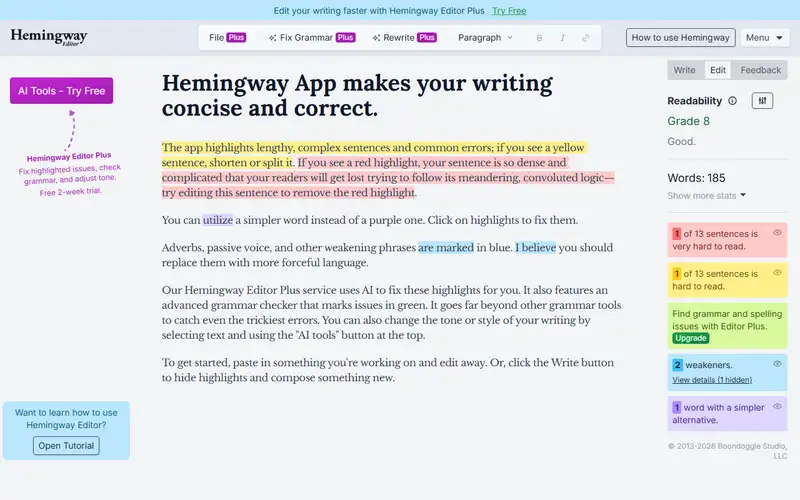
Hemingway is a text box with an opinion about your sentences. Paste a draft and it returns a reading grade plus a colour map: sentences it judges hard come back yellow or red, adverbs blue, passive constructions green, and words it thinks you could simplify are marked too. The newer desktop build also advertises grammar checking and tone adjustment, but the grade and the colouring are still the product, and they are honest about what they measure — effort, not correctness. Its real strength is immediacy. No queue, and no model quietly rewriting your voice: a paragraph that comes back mostly yellow teaches you something a rewrite suggestion never will.
Against Grammarly or ProWritingAid it loses on coverage. It will not reliably catch a comma splice, cannot see that a paragraph buries its point, and has no idea what the document is for; the long diagnostic reports those tools produce are exactly what this one refuses to write. Choose it anyway if your problem is length and passivity rather than accuracy, because it makes both visible in one glance. Check before paying: the web version is free and paste-in, paste-out, while the desktop Editor is a separate one-time purchase rather than a subscription — no renewal, but also no collaboration and no cloud library. If you write inside Google Docs or on a phone keyboard, confirm this is a surface you can actually reach; historically it has been a web page and a desktop app, not an editor you live in.
Sources
The factual claims in this review were read from the pages below. Each date is when an editor last opened the source, not when the product changed.
- Vendor site Checked 2026-09-20
- Third-party report Checked 2026-09-20
Pros / Cons
Pros
- A grade you can see
- Adverbs that get painted
- Punch over a grammar pass
- Desktop without a bot
Cons
- Will not catch every comma
- Not Grammarly's grammar
- Looks like 2013
Who it's for
Painting adverbs red
A grade on a draft
Leaving Grammarly for punch
Shorter sentences
Bottom line
Punch as the editor — Hemingway if sentences should be shorter, Grammarly if they should be correct.
Key Features
Tags
Frequently asked questions
Is Hemingway currently available?
No lifecycle review is recorded for this listing. Its inclusion in the directory does not confirm current availability; check the vendor before relying on it.
What is Hemingway?
Hemingway is a Productivity tool developed by Hemingway. It was introduced in 2013, and its developer is headquartered in USA. A grade for your sentences: yellow, red, adverbs — Grammarly's more style-native cousin for people who want a punch, not a grammar pass.
Is Hemingway free?
Hemingway uses a freemium model: a free tier is available, and paid plans unlock more usage and advanced features.
Is Hemingway open source?
No — Hemingway is proprietary software.
What are the best alternatives to Hemingway?
Notable Productivity alternatives include Notion AI, Grammarly, Canva AI. Browse all 159 tools in our Productivity category for a full overview.
Was this listing useful?
Basic Info
- Pricing
- Freemium
- Editorial score
- ★ 4.5 / 5 How we score
- Platforms
- WebDesktop
- Launched
- 2013
- Headquarters
- USA
- Last verified
- Not recorded