
Photoroom
Photoroom
★ #6 in Image GenerationProduct status: Status not recorded
No lifecycle review is recorded for this listing. Its inclusion in the directory does not confirm current availability; check the vendor before relying on it.
No status check date recorded
Product-image editing with background removal, generated scenes, batch workflows and API access; free accounts are personal and non-commercial. No lifecycle review is recorded for this listing. Its inclusion in the directory does not confirm current availability; check the vendor before relying on it.
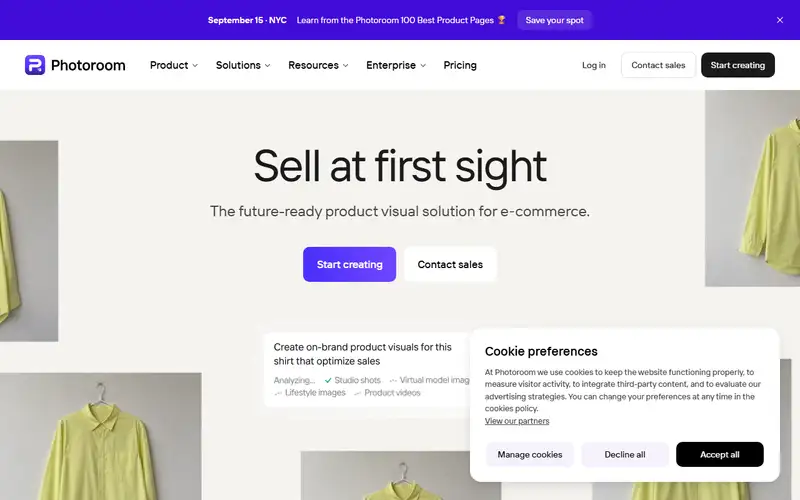
Product preview
Decision notes
Official-document research
Based on the cited documentation. We did not use the product, purchase a plan, or run quality, speed or reliability tests in this review.
Consider it for
- Sellers with licensed product photos and a review step
- Teams planning recurring catalog or API workloads
Choose another approach if
- Free-account commercial production
- Work requiring an unqualified guarantee of exact product reproduction
Pricing and conditions
Documented terms
The page shows Pro, Max and Ultra as monthly equivalents billed yearly and says VAT/GST is included; the displayed $ currency and checkout region were not independently confirmed, so no amount is quoted. Export and AI limits are shared within a Space; AI allowances can vary by region. Current plans include a separate API/MCP wallet charged at API rates, while older API docs describe separate subscriptions: confirm your plan's allowance and overage. Enterprise uses an annual contract and negotiated usage balance.
Pricing source read:
Pricing or terms sourceCode, model and service licensing
Free accounts are personal and non-commercial. A paid subscription does not supply rights to third-party photos, brands or likenesses; you must hold the necessary permissions. Terms allow User Content to improve and train products, with an app Data Control opt-out. Check those settings and your contract before uploading sensitive material. Product-fidelity guarantees are separately scoped Enterprise arrangements, not a promise for every image.
Basis and limits of the recorded score
The existing 4.7 score is retained without recovered original scoring evidence. This document review did not re-score cutout quality, fidelity or commercial results.
Overview
Photoroom edits product images through web and mobile apps, batch workflows and an API. Its documented tools include background removal, retouching, shadows and generated product scenes. Product Staging starts with an uploaded product photo and generates lifestyle compositions; batch editing applies chosen operations across images. These are candidates for catalog preparation and campaign drafts, not evidence that every product detail or marketplace requirement will be preserved.
Select a Space plan by commercial rights, export volume, AI-tool consumption and automation needs. Free accounts are limited to personal, non-commercial use. Paid app plans have separate export, AI and API/MCP allowances; Enterprise uses a contracted annual balance. Review product shape, labels, colors and the target marketplace's rules before publishing. No sales uplift, processing speed or comparison with another editor was measured here.
Sources
The factual claims in this review were read from the pages below. Each date is when an editor last opened the source, not when the product changed.
- Vendor documentation Checked 2026-10-15
- Vendor documentation Checked 2026-10-15
- Vendor documentation Checked 2026-10-15
- Vendor documentation Checked 2026-10-15
- Vendor documentation Checked 2026-10-15
- Vendor pricing page Checked 2026-10-15
- Vendor pricing page Checked 2026-10-15
- Vendor documentation Checked 2026-10-15
Pros / Cons
Pros
- Product-focused cleanup and scene tools
- Batch and API workflow options
- Space plans expose separate usage allowances
Cons
- Free accounts cannot be used commercially
- Exports and AI operations have different limits
- Generated product details need human review
Who it's for
Product cutouts for reviewed listings
Lifestyle scene drafts for campaigns
Catalog edits through batch or API
Bottom line
Consider Photoroom for repeated product-image work when you can budget the relevant usage pools and review each output for product fidelity and publishing rights.
Key Features
Tags
Compare Photoroom with alternatives
Frequently asked questions
Is Photoroom currently available?
No lifecycle review is recorded for this listing. Its inclusion in the directory does not confirm current availability; check the vendor before relying on it.
What is Photoroom?
Photoroom is a Image Generation tool developed by Photoroom. Product-image editing with background removal, generated scenes, batch workflows and API access; free accounts are personal and non-commercial.
What costs and terms should I check for Photoroom?
The page shows Pro, Max and Ultra as monthly equivalents billed yearly and says VAT/GST is included; the displayed $ currency and checkout region were not independently confirmed, so no amount is quoted. Export and AI limits are shared within a Space; AI allowances can vary by region. Current plans include a separate API/MCP wallet charged at API rates, while older API docs describe separate subscriptions: confirm your plan's allowance and overage. Enterprise uses an annual contract and negotiated usage balance.
Is Photoroom open source?
Free accounts are personal and non-commercial. A paid subscription does not supply rights to third-party photos, brands or likenesses; you must hold the necessary permissions. Terms allow User Content to improve and train products, with an app Data Control opt-out. Check those settings and your contract before uploading sensitive material. Product-fidelity guarantees are separately scoped Enterprise arrangements, not a promise for every image.
What are the best alternatives to Photoroom?
Notable Image Generation alternatives include Midjourney, Stable Diffusion, Leonardo AI. Browse all 57 tools in our Image Generation category for a full overview.
Was this listing useful?
Basic Info
- Pricing
- Freemium
The page shows Pro, Max and Ultra as monthly equivalents billed yearly and says VAT/GST is included; the displayed $ currency and checkout region were not independently confirmed, so no amount is quoted. Export and AI limits are shared within a Space; AI allowances can vary by region. Current plans include a separate API/MCP wallet charged at API rates, while older API docs describe separate subscriptions: confirm your plan's allowance and overage. Enterprise uses an annual contract and negotiated usage balance.
- Editorial score
- ★ 4.7 / 5 How we score
- Platforms
- WebiOSAndroidAPI
- Last verified
- Not recorded