
Vizcom
Product status: Status not recorded
No lifecycle review is recorded for this listing. Its inclusion in the directory does not confirm current availability; check the vendor before relying on it.
No status check date recorded
Sketch-led design visualization with rendering, variations and layered/3D exports; rights and training depend on account type. No lifecycle review is recorded for this listing. Its inclusion in the directory does not confirm current availability; check the vendor before relying on it.
Product preview
Decision notes
Official-document research
Based on the cited documentation. We did not use the product, purchase a plan, or run quality, speed or reliability tests in this review.
Consider it for
- Designers reviewing concepts before production
Choose another approach if
- Unreviewed engineering geometry
- Assuming free output has paid commercial rights
Pricing and conditions
Current terms unconfirmed
Starter lists 800 monthly credits; Professional lists $49/user/month and 20,000 credits, but the retrieved monthly/annual toggle state and ISO currency are not established. Terms exclude taxes; local tax and final quote need confirmation. Admins/Editors are paid seats, Viewers free. Plan credits reset monthly; unused purchased add-on credits roll over. Add-on rates, feature costs and annual charge require confirmation.
Pricing source read:
Pricing or terms sourceCode, model and service licensing
The platform/models are proprietary. Formal terms §§3/9/10 say Starter designs belong to Vizcom and Starter content/designs may train the service, contrary to the pricing FAQ's all-user ownership statement. Education retains design ownership but is non-commercial academic use and may train, with a separate institutional under-13 opt-in exception. Premium users retain inputs/designs and receive service-only processing without model training. Resolve the Starter conflict before relying on commercial rights; ownership does not clear third-party assets. No guaranteed archival storage or zero-retention term was established.
Basis and limits of the recorded score
The existing 4.5/5 rating is retained. Its original scoring worksheet is unavailable; this documentation review does not rescore the product or measure output quality.
Overview
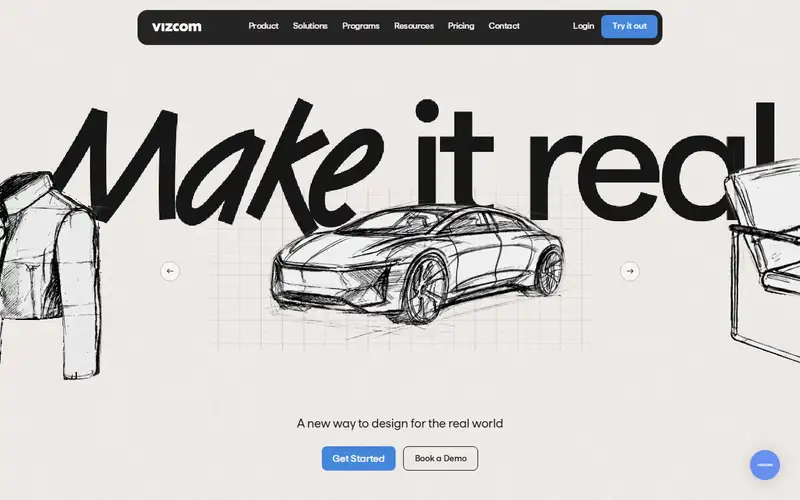
Vizcom turns sketches and imported visuals into design concepts, with rendering, variations and 2D-to-3D options documented for a hosted workspace. The Export Panel supports images, layered PSD, video and several 3D formats, with plan-specific limits.
Treat outputs as concepts requiring dimensional, material and rights review before engineering or publication. Its pricing FAQ says users own their designs, but formal terms assign Starter designs to Vizcom; confirm the governing account type before commercial work.
Sources
The factual claims in this review were read from the pages below. Each date is when an editor last opened the source, not when the product changed.
- Vendor site Checked 2026-10-15
- Vendor pricing page Checked 2026-10-15
- Vendor documentation Checked 2026-10-15
- Vendor documentation Checked 2026-10-15
- Vendor documentation Checked 2026-10-15
Pros / Cons
Pros
- Sketch-led concept iteration
- Layered and 3D export choices
Cons
- Credits and paid editor seats need budgeting
- Starter ownership statements conflict across pages
Who it's for
Industrial/product design presentations
Layered concept handoff for further editing
Bottom line
Consider it for sketch-led visualization after resolving the plan's output rights and credit budget.
Key Features
Tags
Frequently asked questions
Is Vizcom currently available?
No lifecycle review is recorded for this listing. Its inclusion in the directory does not confirm current availability; check the vendor before relying on it.
What is Vizcom?
Vizcom is a Image Generation tool developed by Vizcom. Sketch-led design visualization with rendering, variations and layered/3D exports; rights and training depend on account type.
What costs and terms should I check for Vizcom?
Starter lists 800 monthly credits; Professional lists $49/user/month and 20,000 credits, but the retrieved monthly/annual toggle state and ISO currency are not established. Terms exclude taxes; local tax and final quote need confirmation. Admins/Editors are paid seats, Viewers free. Plan credits reset monthly; unused purchased add-on credits roll over. Add-on rates, feature costs and annual charge require confirmation.
Is Vizcom open source?
The platform/models are proprietary. Formal terms §§3/9/10 say Starter designs belong to Vizcom and Starter content/designs may train the service, contrary to the pricing FAQ's all-user ownership statement. Education retains design ownership but is non-commercial academic use and may train, with a separate institutional under-13 opt-in exception. Premium users retain inputs/designs and receive service-only processing without model training. Resolve the Starter conflict before relying on commercial rights; ownership does not clear third-party assets. No guaranteed archival storage or zero-retention term was established.
What are the best alternatives to Vizcom?
Notable Image Generation alternatives include Midjourney, Stable Diffusion, Leonardo AI. Browse all 57 tools in our Image Generation category for a full overview.
Was this listing useful?
Basic Info
- Pricing
- Freemium
Starter lists 800 monthly credits; Professional lists $49/user/month and 20,000 credits, but the retrieved monthly/annual toggle state and ISO currency are not established. Terms exclude taxes; local tax and final quote need confirmation. Admins/Editors are paid seats, Viewers free. Plan credits reset monthly; unused purchased add-on credits roll over. Add-on rates, feature costs and annual charge require confirmation.
- Editorial score
- ★ 4.5 / 5 How we score
- Platforms
- Web
- Last verified
- Not recorded