
VoiceMaker
VoiceMaker
★ #48 in Audio GenerationProduct status: Status not recorded
No lifecycle review is recorded for this listing. Its inclusion in the directory does not confirm current availability; check the vendor before relying on it.
No status check date recorded
A text-to-speech platform with hundreds of voices and neural effects, built for converting articles and scripts into downloadable audio files. No lifecycle review is recorded for this listing. Its inclusion in the directory does not confirm current availability; check the vendor before relying on it.
Product preview
Overview
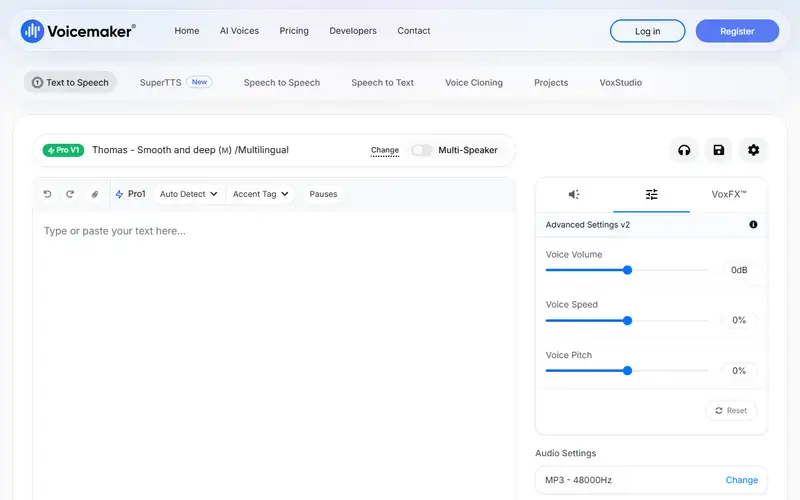
VoiceMaker is a browser-based text-to-speech studio that has stayed close to one job: paste a script, pick a voice, download the audio. Its homepage advertises 2,000+ AI voices in 130 languages across two engine classes — standard voices and neural ones, with the FlashX and ProPlus backends gated behind premium plans — plus a dedicated Cloned Voices section with user-managed voice profiles. The most practical edge is export breadth: MP3 and WAV as expected, but also OGG, AAC, OPUS and ULAW codecs, which makes it usable for IVR and telephony work that consumer TTS tools ignore, and word-level pause, emphasis and pitch controls cover e-learning narration.
Where it loses: out-of-the-box realism trails the neural leaders, the interface is utilitarian, and the developer API lives on a separate documentation portal rather than inside the product. Three things the homepage does not answer must be checked before paying. Consent and identity verification in the cloning flow — a Cloned Voices tab is not a stated policy on whose voices may be copied. Commercial usage rights, because downloadable files are not automatically cleared for client or broadcast work. And whether monthly character quotas, rollover rules and API metering fit your script volume, since VoiceMaker sells characters per month, not audio minutes.
Sources
The factual claims in this review were read from the pages below. Each date is when an editor last opened the source, not when the product changed.
- Vendor site Checked 2026-09-20
Pros / Cons
Pros
- Hundreds of voices and effects
- Pause, emphasis and pitch controls
- Downloadable audio files
- API for product integration
Cons
- Voice realism trails top specialists
- Effect variety can overwhelm
- Long-text workflows limited on lower plans
Who it's for
E-learning narration
IVR and phone system audio
Video voiceover drafts
Bottom line
VoiceMaker is the straightforward TTS utility when you just need clean, downloadable speech.
Key Features
Tags
Frequently asked questions
Is VoiceMaker currently available?
No lifecycle review is recorded for this listing. Its inclusion in the directory does not confirm current availability; check the vendor before relying on it.
What is VoiceMaker?
VoiceMaker is a Audio Generation tool developed by VoiceMaker. It was introduced in 2020, and its developer is headquartered in Remote / India. A text-to-speech platform with hundreds of voices and neural effects, built for converting articles and scripts into downloadable audio files.
Is VoiceMaker free?
VoiceMaker uses a freemium model: a free tier is available, and paid plans unlock more usage and advanced features.
Is VoiceMaker open source?
No — VoiceMaker is proprietary software.
What are the best alternatives to VoiceMaker?
Notable Audio Generation alternatives include ElevenLabs, Suno, Udio. Browse all 51 tools in our Audio Generation category for a full overview.
Was this listing useful?
Basic Info
- Pricing
- Freemium
- Editorial score
- ★ 4 / 5 How we score
- Platforms
- WebAPI
- Launched
- 2020
- Headquarters
- Remote / India
- Last verified
- Not recorded